Your customer records are an inbox, a diary and a notebook — and none of them is complete
The phone rings and the search begins: when was the last job, was the invoice paid, did the quote ever arrive? The answer is somewhere — in an email, in the diary, on a note in the van. Capwork keeps the records for you: every message, every booking and every order lands on the right customer, without anybody typing anything up.
 AI-generated image
Sound familiar?
- A regular calls, and first you search three inboxes for the last job you did for them.
- The same customer is in your contacts three times — once with an email, once with a mobile number, once with a typo.
- Who brings in the most revenue and who always pays late is a gut feeling, not a number.
- Customers who have not booked in a year only get noticed once they are with the competition.
- Customers call to ask when the electrician is coming or whether the quote arrived.
- When someone asks for their data or its deletion under the GDPR, the search starts across every program you use.
What you get back
The records keep themselves along the way: every message, booking and order lands on the right customer, duplicates are spotted, and figures such as revenue, payment record and last activity update themselves. Your customers see their appointments, orders and quotes in a portal of their own — instead of calling you about them.
How Capwork fixes it
- 1
The records build themselves
When somebody writes by email, SMS or WhatsApp, books an appointment or gets an order, the customer record is created by itself. Existing lists come in by CSV import with name, email address and phone number. Capwork recognises known customers by their normalised email address and phone number; anything that is still duplicated you merge in one click.
- 2
One history per customer
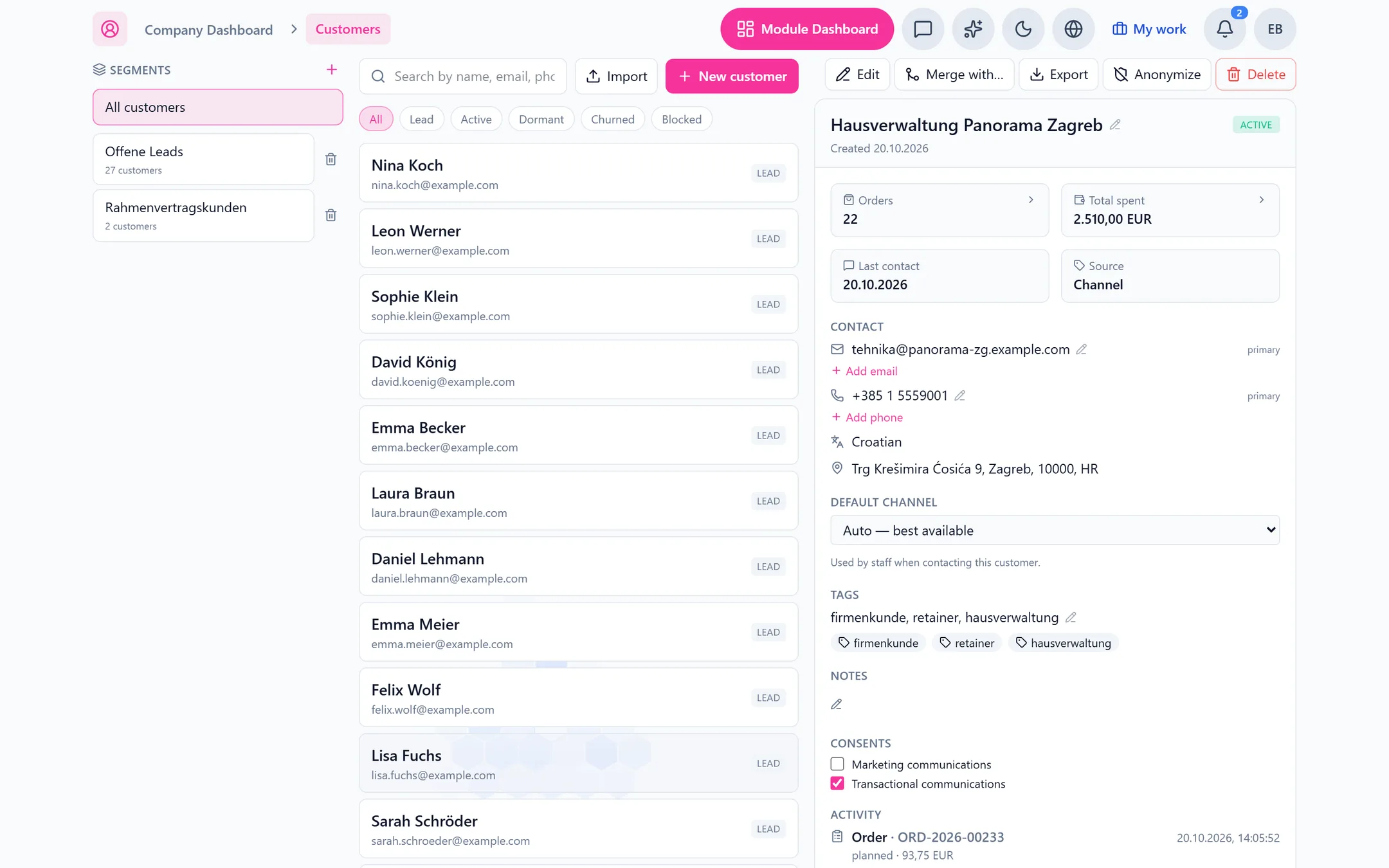
Bookings, orders, messages, automatic confirmations and reminders, and payments sit on one timeline. Alongside them: tags, notes, the preferred contact channel and the consents for marketing and for service messages. Whoever calls is placed in seconds — even by a colleague who has never served them.
- 3
Figures that keep themselves current
Number of orders, total spent, last activity, share of on-time payments and average rating — for every customer, no spreadsheet. You see who carries your business and where it pays to look more closely.
- 4
Segments that update themselves
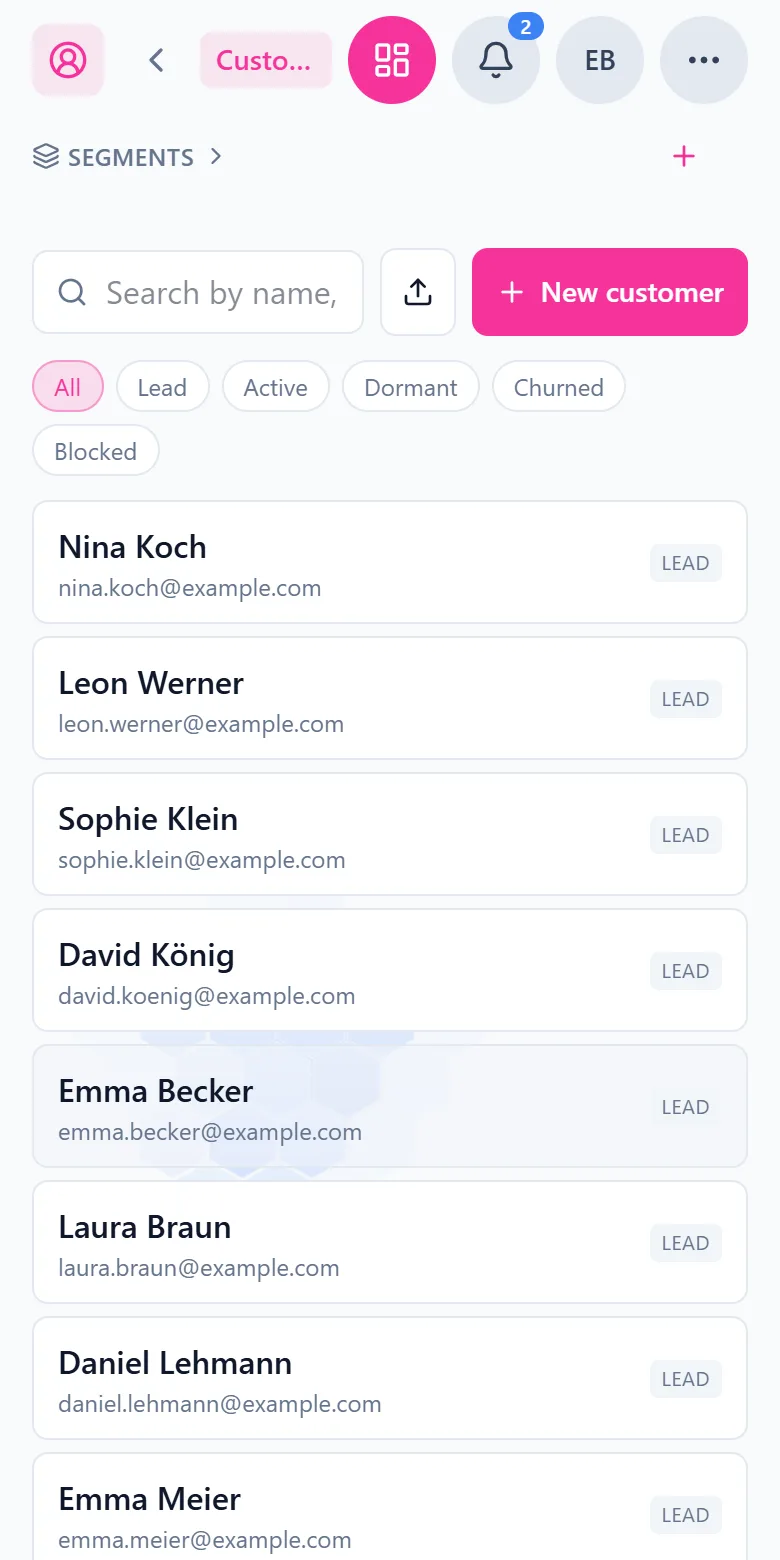
Filter by lifecycle stage — lead, active, dormant, churned, blocked — by tags, by a minimum number of orders, a minimum spend or “no contact in 90 days”. Segments recompute themselves, and you see at a glance whom to call this week.
- 5
A customer portal with no password
Customers sign in with a code sent by email. They see their appointments and cancel upcoming ones, choose which messages they receive — reminders, offers of freed-up slots — follow their orders, accept or decline quotes online and send new requests. On acceptance, the legally required consent to start work before the withdrawal period ends is collected at the same time.
- 6
Order status by link, no sign-in needed
Every order has a link where the customer sees how it stands — including “on the way” and “work in progress” — and, at the end, the signed work report. Photos, say of the fuse box, they upload right there instead of sending them to somebody by messenger.
See it with real data
Open an example electrical contractor and one of its business customers: orders, revenue, payment record and the whole history of bookings, orders and messages on one page. The sidebar holds the segments that keep themselves current. No signup, nothing to install.
What you need for this
No base fee. Customers are billed per active resource, that is per active customer per month — the cost grows with the number of customers you actually serve. Appointments, orders and the inbox are modules of their own and are billed separately.
FAQ
No. Customers are created by themselves as soon as they write, book or get an order. An existing list comes in by CSV import with name, email address and phone number — everything else fills in over time from the work you are already doing.
By email address and phone number, both normalised — upper or lower case in the address, or spaces, slashes and dashes in the number, make no difference. If a customer still ends up in there twice, say once with a business and once with a private address, you merge the two records in one click.
No. Segments show you whom to approach — regulars who have not booked for three months, for example — and recompute themselves continuously. Capwork does not send bulk messages to a segment; we would rather say so plainly than promise it.
No. They sign in with a code they receive by email. In the portal they see their appointments and cancel upcoming ones — for a different time they simply book again — follow orders, accept or decline quotes and send new requests. They can also see how an order stands without signing in, through the order’s link.
With one click each: the export gathers a customer’s data in one place, and anonymisation strips the personal details from the customer record. Consents for marketing and for service messages are recorded on the customer. Hosting is in data centres in the EU, and a data processing agreement under Art. 28 GDPR is available.
There is no base fee. Billing is per active customer per month. The current prices are on this page. The first 14 days are free; no payment method is needed for them.
More you can put right
Online booking
Online appointment booking for your website
No-shows and double-bookings
Stop no-shows and double-bookings
Enquiries in five places
Get every customer enquiry into one inbox
Where the money goes
Know where your money actually goes
Team, vans and kit
Who is qualified, who is in, which van is free
Staff roster
Staff roster online — with bookings and hours balances
Planning the day
Plan the week without re-planning it twice
Running out of stock
Stop jobs stalling on a missing part
Services in 24 languages
A service catalog in 24 languages, with product images
Fleet under control
Fleet management: due dates, logbook and reservations
Suppliers at a glance
Supplier management — straight from your invoices
Nothing slips through
Tasks and approvals: so nothing slips through
Let the records keep themselves
Connect your inbox or import your customer list — from then on every contact lands on the right customer.