The roster that knows what’s coming up
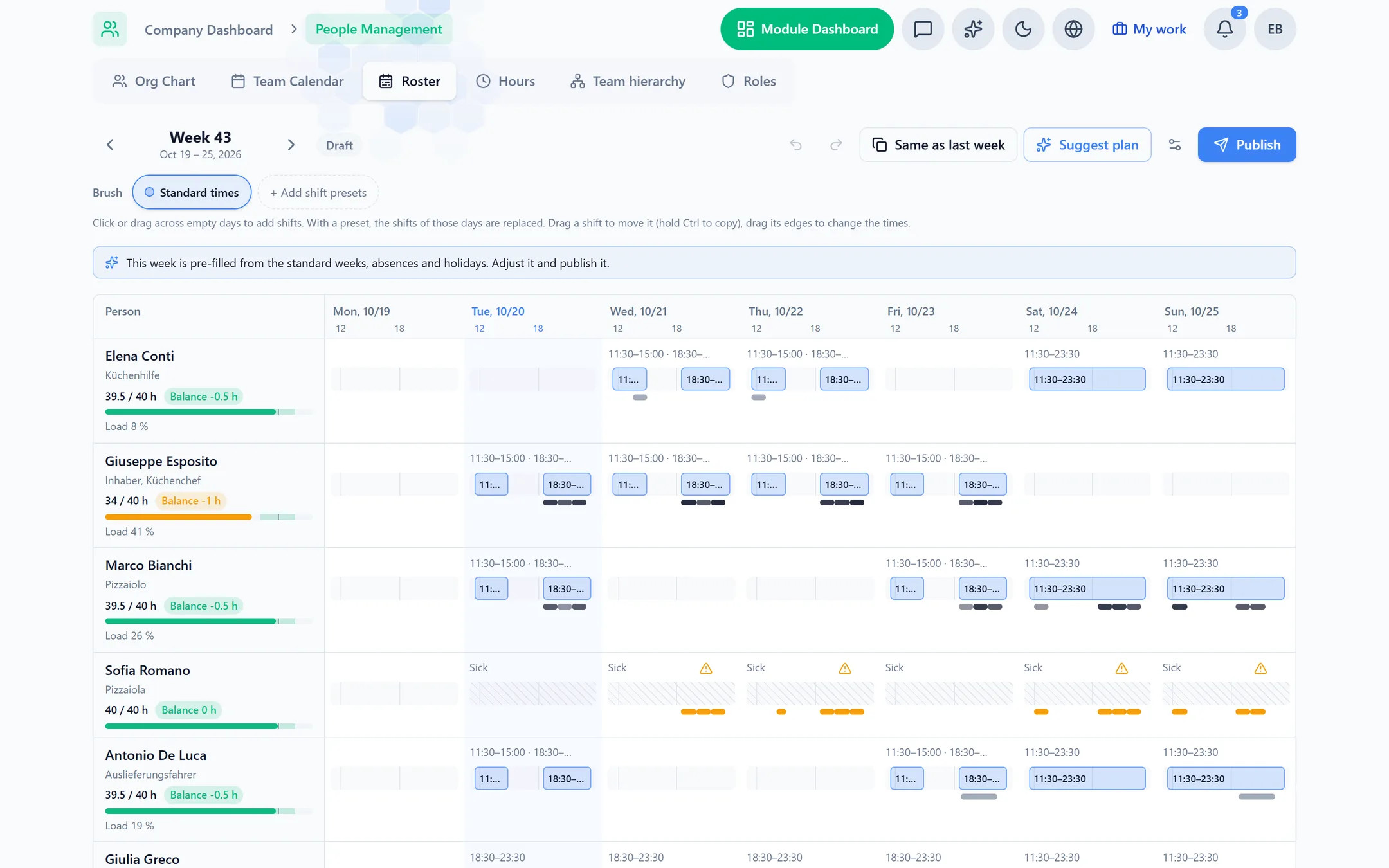
Most rosters are a blank grid you fill in by hand every week, next to a calendar that knows nothing about it. Capwork’s roster opens already filled in: each person’s standard week, holidays and sick days, your public holidays, and the appointments and jobs already booked. You only adjust it, and once you publish, customers can only book people who are on duty.
 AI-generated image
Sound familiar?
- Every week you write the same roster again, on paper or in a spreadsheet.
- Saturday is fully booked, and one person is on the roster.
- The roster says someone is off, and the online calendar still takes bookings for them.
- An appointment needs a particular skill, and nobody who has it is in that day.
- Who is owed hours and who owes them only comes out at the end of the month, if at all.
- Holiday is kept in one place, the roster in another, and they disagree.
What you get back
A week you adjust instead of typing it up from scratch, and a roster that cannot contradict your calendar: what you publish is when each person can be booked and planned. Everyone’s hours stay within a range you set, and the hours balance shows who is ahead and who is behind before it becomes a problem.
How Capwork fixes it
- 1
The week is already filled in
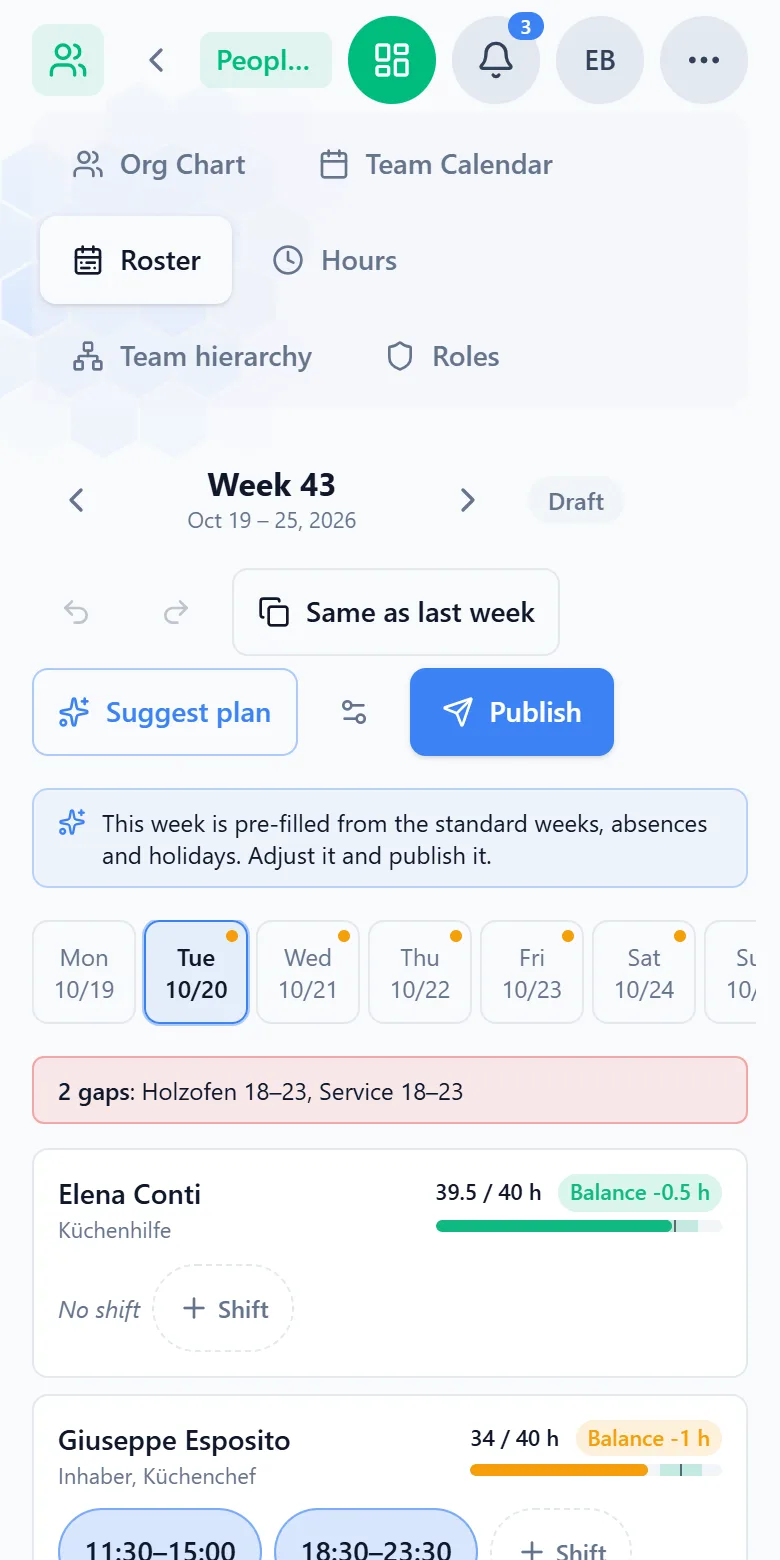
The first time you open a week, each person’s standard week is already in it; holidays, sick days and public holidays stay free. “Same as last week” copies the week before. On a computer you paint, move and resize shifts with the mouse, with shift presets such as early and late; on a phone you tap a shift and change its times. Split shifts such as 10–14 and 17–22 work too.
- 2
You see what is booked, and who can do it
Each person’s row shows their booked appointments and job visits. Under every day, a strip per skill shows each hour green when enough qualified people are on shift, amber when one is missing, and red when more are missing or nobody is there. Opening hours with nobody on duty are marked as gaps, and a day booked beyond someone’s shift time stands out.
- 3
Hours within range, with an hours balance
Each row shows planned against contracted hours, coloured by the range (±10 % by default), and the person’s balance. A 43-hour week on a 40-hour contract is within range and puts +3 h on the balance. Recorded time counts where there is any, and holidays, sick days and public holidays on working days are credited.
- 4
“Suggest plan” does the arithmetic
One click proposes changes: cover booked work that has nobody qualified on shift, staff opening hours nobody covers, and bring each person’s hours toward their aim. Every change gives its reason, such as “14:00–15:00: booked, nobody with Hairdresser on shift”. The suggestion follows fixed rules, nothing changes until you apply it, and shifts you edited by hand or that carry booked work are never shortened.
- 5
Publish, and booking and planning follow it
Once published, the shifts are the working hours: online booking and job planning only use people who are on duty. If a shorter shift leaves appointments or tasks outside it, Capwork lists them straight away and you decide for each one: keep it, hand it to a qualified colleague who is on shift, or release it.
- 6
Hints on working-time rules for Germany and Austria
More than 10 hours of work in a day, less than 11 hours of rest, breaks that are too short, work on a Sunday (in Germany also on public holidays): the roster points them out. The hints never block a plan, and they do not replace a legal review.
See it with real data
Open the example pizzeria: next week’s roster is already there as a draft, with one gap left open. Try “Suggest plan”, look at everyone’s hours and publish. No sign-up, no installation.
What you need for it
The roster is part of People Management and costs nothing extra: it is billed per active person per month. With Appointments and Orders, booked work shows on the grid as soon as you use them.
FAQ
No. Whoever holds the permission plans and publishes, usually the owner or a manager. Team members with their own login and access to People Management see the published shifts in the roster, on a phone too, read-only. There is no staff app for requesting days off, swapping shifts or being notified of changes yet, so you tell your team about changes as you do today.
Nothing until you publish, and the roster already marks appointments outside a shift while you edit. After publishing, Capwork lists every appointment and task not yet started that now lies outside the person’s shifts, and you decide for each: keep it, hand it to a qualified person on shift, or release it. Nothing is cancelled without your decision, and new bookings follow the new shifts at once.
Through the hours balance. Each week counts against the target from the contracted hours: recorded time where there is any, the planned shift otherwise, and holidays, sick days and public holidays on working days are credited. Someone on a 40-hour contract who works a 43-hour week stands at +3 h. “Suggest plan” then proposes slightly shorter weeks until the balance is back at zero: spread over four weeks by default, or about 37 hours the very next week if you balance over one. An opening balance for existing overtime is entered once on the person.
No, it works with it. In the Hours tab, people record their own working time or a manager enters it, and time from on-site jobs is added automatically. The monthly report shows the target, the hours counted and the balance. Where hours were typed in for a day, they count instead of the plan; job time can only lengthen a day. Payroll, and an export for it, are not included.
It gives hints for Germany (ArbZG) and Austria (AZG/ARG): more than 10 hours of work a day, less than 11 hours of rest, breaks too short for the hours worked, and Sunday work, in Germany public-holiday work too. The country follows your company address and can be changed. The hints never block and do not replace legal advice.
Yes. Without bookings, your opening hours are what counts: the roster marks hours when you are open and nobody is on duty, and “Suggest plan” proposes who covers them.
Not as one shift: a shift ends at 24:00 at the latest. A night from 22:00 to 06:00 is entered as two shifts, one on each day.
More you can put right
Online booking
Online appointment booking for your website
No-shows and double-bookings
Stop no-shows and double-bookings
Enquiries in five places
Get every customer enquiry into one inbox
Where the money goes
Know where your money actually goes
Team, vans and kit
Who is qualified, who is in, which van is free
Planning the day
Plan the week without re-planning it twice
Running out of stock
Stop jobs stalling on a missing part
Services in 24 languages
A service catalog in 24 languages, with product images
Customer records
Customer records that keep themselves up to date
Fleet under control
Fleet management: due dates, logbook and reservations
Suppliers at a glance
Supplier management — straight from your invoices
Nothing slips through
Tasks and approvals: so nothing slips through
Your next week, already filled in
Add your team with their standard weeks and contracted hours, and from then on every week opens pre-filled.